HANDOVER DOCUMENT AND MOBILE

How a car left and how it came back stay on record.

The same sheet is written at hand-over and at return: odometer, fuel, the state of each panel, photographs and the customer's signature. The day's hand-overs and returns sit on one board, and out in the field on the iPhone and iPad app.

AT THE DESK TODAY

The keys pass from hand to hand and nobody writes the state down.

  • “That scratch was already there” at return

    If the car's diagram was not marked at hand-over, nobody holds a record of when a damage found at return appeared.

  • A paper form and a lost page

    Odometer and fuel are written on paper and the paper stays in a folder; on return day matching it to the booking means another search.

  • No desk at the airport

    When the car is handed over in the car park, writing the sheet means going back to a desk, with the customer and the staff both waiting.

HOW IT WORKS

The sheet in four steps.

Pressing Hand over or Take back on the booking page opens the same sheet.

  1. Time, odometer and fuel

    Enter the time, the odometer and the fuel. The panel reminds you of the car's last reading; fuel is eight notches, not a percentage. If the customer is with you, you tick the box.

  2. Mark the panels

    On the twenty-panel car diagram each press on a panel steps its state on: Original, Scratch, Dent, Damage, Missing. For every marked panel you write a note and add a photograph.

  3. The customer signs on screen

    The customer signs with a finger or a mouse; the signature is not required and you can save without one. The sheet is written once, and afterwards only the sheet note can be corrected.

  4. Print it or save a PDF

    From the Print menu you open the handover form, the reservation voucher or the welcome sign in a new tab; print it from the browser or save it as a PDF. You can choose the document's language.

MOBILE AND TABLET MANAGEMENT PANEL

The panel, where the car changes hands.

Minata Panel runs on iPhone and iPad: open a rental away from the desk, take the payment, and fill in the handover report standing at the car.

The app is in every plan, at no extra cost.

  • Collect on the spot

    Enter a card or cash payment at handover; the till and the balance move with it.

  • Handover report with a damage map

    Mark the damage on the car diagram at pick-up and return, photograph it, have it signed.

  • ID, passport, licence

    Read the document with the camera; the details land on the customer record.

  • Instant notifications

    A new booking, a cancellation or a payment arrives on your phone.

iPhone and iPad · Coming soon to the App Store

Android version in the works

App screen
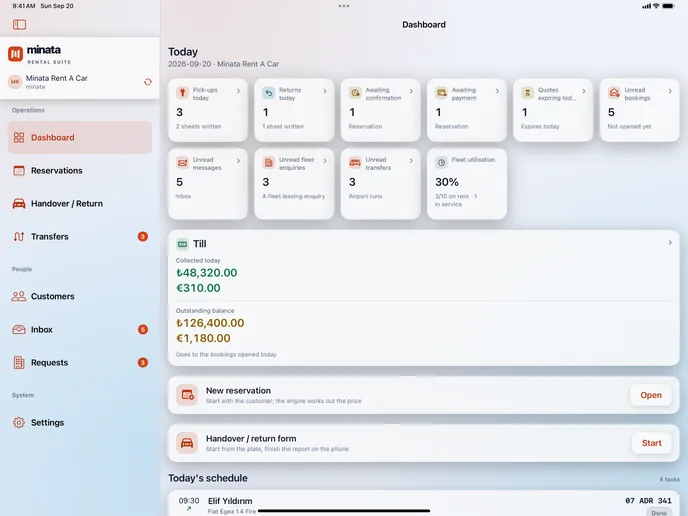
The Minata Panel home screen: today's pick-ups and returns, open rentals and the day's takings. iPad view.
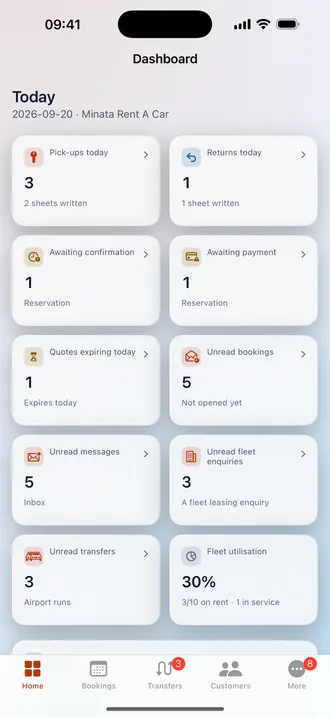
The Minata Panel home screen: today's pick-ups and returns, open rentals and the day's takings. iPhone view.

Today's pick-ups, returns and open rentals on one screen.

The screens come from the application itself; the data is a sample.

DETAILS

The documents, and what is checked at return.

In the panel: Booking, Print, Handover form

The paper handover form

The delivery and return form puts the driver, additional driver, car, places, odometer, fuel, diagram and equipment list on one page, with signature boxes for who hands over and who receives.

In the panel: Booking, Take back

A return starts from the hand-over's panels

On the return sheet the panels come from the hand-over sheet, which sits read-only at the top. Every row that got worse is marked and opens a damage record.

In the panel: Booking, Print, Welcome sign

The welcome sign

The card held up at the airport or the door: your logo, the customer's name as large as it will go on one line and, when there is one, the flight number. It shows no price.

In the panel: Booking, Hand over / Take back

Open damages show on the sheet

While you write the sheet, the open damages on file for the car are listed; those left from an earlier rental are marked as such. Each shows when it was reported.

QUESTIONS

About the handover document and mobile.

If the answer is not here, write to the sales team.

Write to sales
Is the sheet written at hand-over or at return?
At both. The same sheet serves both ends; at return the panels come from the hand-over sheet, while the odometer box deliberately opens empty and cannot go below the last reading.
Is the sheet saved if the customer does not sign?
Yes. The signature is not required; the sheet is saved unsigned. On the board, signed sheets carry a mark of their own.
Can I correct a sheet afterwards?
Only the Sheet note. Odometer, fuel and panels cannot be changed once the sheet is written, which keeps it worth something as a record.
What is the mobile app and where do I download it?
Minata Panel is the panel's iPhone and iPad app (iOS 16 and later), included in every plan. It is not yet open for public download and has no download link; it will be announced on this page once it is. There is no Android version.
What can I do in the app?
You see the day's board, look at bookings and customers, follow the inbox and requests, write the handover sheet in six steps and receive notifications. You can scan an ID card, a passport or a licence with the camera; the value read is checked before it is written. The session stays open for 30 days.

Shall we try the sheet with your own cars?

Ask for a demo; we will hand a car over and take it back in the panel together.